Introduction
Digital onboarding in India has fundamentally changed since UIDAI introduced Aadhaar-based eKYC. What once took days of paperwork, in-person visits, and manual document verification now completes in under two minutes — with a single, consent-driven Aadhaar card number check.
Yet despite widespread adoption, many businesses and developers still struggle to understand how Aadhaar eKYC actually works under the hood. The regulatory framework, the technical architecture, and the compliance obligations that come with accessing citizen identity data at scale all require careful attention.
This guide cuts through the noise. Whether you are a fintech startup building an onboarding flow, a bank evaluating digital verification options, or a developer integrating Aadhaar eKYC online into your stack, this article covers the full picture — from how the process works to what you need to get it right.
Table of Contents
- What is Aadhaar eKYC?
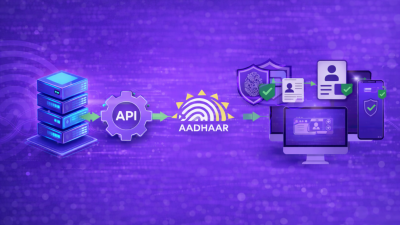
- How Aadhaar eKYC Works: The Technical Flow
- Types of Aadhaar eKYC Authentication
- Aadhaar Verification vs. Traditional KYC: A Practical Comparison
- Who Can Use Aadhaar eKYC? Regulatory Access Framework
- Integration for Developers: What the API Process Looks Like
- Aadhaar Card Number Check: What Gets Verified and What Does Not
- Compliance, Consent, and Data Handling Requirements
- Common Mistakes Businesses Make with Aadhaar eKYC
- Key Takeaways
- FAQs
1. What is Aadhaar eKYC?
Aadhaar eKYC (electronic Know Your Customer) is a paperless, digital identity verification service that UIDAI provides to authorized entities. It allows Authentication User Agencies (AUAs) or KYC User Agencies (KUAs) to verify a resident’s identity and fetch their demographic data directly from UIDAI’s Central Identities Data Repository (CIDR) in real time.
The key distinction between Aadhaar verification and a simple Aadhaar card number check lies in what each process returns. Basic authentication confirms whether the provided identity attributes match the UIDAI database. An eKYC transaction, however, goes further — it returns verified demographic data (name, address, date of birth, gender, photograph) in an encrypted XML file called the eKYC XML, signed by UIDAI.
Importantly, this output carries legal recognition under the Prevention of Money Laundering (Maintenance of Records) Rules, 2005. Consequently, regulators accept it as valid KYC documentation across banking, insurance, telecom, and securities sectors.
2. How Aadhaar eKYC Works: The Technical Flow
Understanding the data flow is essential for both business decisions and technical integration. Here is how a standard Aadhaar eKYC online transaction works from start to finish.
Step 1 — Resident Initiates Verification
The user provides their 12-digit Aadhaar number on the business’s onboarding interface. This action triggers the authentication request.
Step 2 — Consent Capture
Before the system fetches or transmits any data, it must capture explicit consent from the resident. UIDAI mandates that consent be informed, specific, and recorded. This step is not optional — it is a legal requirement.
Step 3 — Authentication Factor Submission
Depending on the authentication mode (OTP, biometric, or offline), the resident submits their authentication factor. In the most common implementation, UIDAI sends a one-time password to the mobile number the resident registered with Aadhaar.
Step 4 — Request Transmitted via AUA/KUA
Next, the business (or its technology partner) transmits the encrypted authentication request to UIDAI’s authentication server through the authorized AUA or KUA channel. The request includes the Aadhaar number, the authentication input, and the AUA’s digital signature.
Step 5 — UIDAI Validates and Returns eKYC Data
UIDAI then validates the authentication inputs against CIDR. On success, it returns an encrypted eKYC XML containing the resident’s demographic data, signed with UIDAI’s private key.
Step 6 — Business Decrypts and Processes Data
Finally, the KUA decrypts the XML using its session key and processes the identity data. The business can then use this data for account creation, credit assessment, or regulatory filing purposes.
The entire flow typically completes in under 5 seconds.
3. Types of Aadhaar eKYC Authentication
Not all Aadhaar eKYC online transactions work the same way. UIDAI supports multiple authentication modes, and each mode suits different use cases and risk profiles.
OTP-Based eKYC
This is the most widely deployed mode. UIDAI sends an OTP to the mobile number linked with the resident’s Aadhaar. However, this mode works only if the resident has a registered mobile number in UIDAI’s records. It is generally sufficient for low-to-medium risk onboarding in fintech, insurance, and NBFCs.
Biometric-Based eKYC
This mode uses a fingerprint or iris scan for authentication. As a result, it requires certified biometric capture devices and works best in high-security or assisted environments such as bank branches, Common Service Centres (CSCs), or telecom enrolment points. Biometric eKYC carries stronger legal weight because it confirms physical presence and liveness.
Offline KYC (Aadhaar XML / DigiLocker)
UIDAI introduced offline KYC as a privacy-preserving alternative. In this approach, the resident downloads a signed XML from the UIDAI portal or through DigiLocker. Crucially, no Aadhaar number passes to the requesting entity. This mode is increasingly preferred for non-regulated sectors or for entities that do not wish to become AUAs.
Face Authentication
Face authentication is a newer addition that uses AI-based liveness detection and facial comparison against UIDAI-stored photographs. It is gaining adoption in digital lending and account opening workflows where biometric hardware is unavailable.
4. Aadhaar Verification vs. Traditional KYC: A Practical Comparison
The business case for Aadhaar eKYC is well-established. Nevertheless, it helps to understand the specific advantages and limitations compared to document-based KYC.
Traditional KYC requires a business to collect physical or scanned identity documents, manually verify them against source databases (or via OCR), check for tampering, and cross-reference with address proofs. This process is labor-intensive, error-prone, and expensive at scale. In fact, the average cost per KYC in a traditional model ranges from INR 80 to INR 300, depending on the channel.
Aadhaar eKYC, by contrast, returns UIDAI-authenticated data directly. As a result, it eliminates document forgery risk entirely, reduces per-KYC costs to under INR 20 in most implementations, and compresses onboarding time from days to seconds.
That said, Aadhaar verification does not provide a complete identity picture. It does not validate PAN, income, creditworthiness, or criminal history. For regulated financial services, it satisfies the identity and address components of KYC — but businesses must supplement it with PAN verification for tax compliance and additional due diligence for high-risk customers under RBI’s Risk-Based Approach (RBA) guidelines.
5. Who Can Use Aadhaar eKYC? Regulatory Access Framework
This is where many businesses encounter compliance gaps. Aadhaar-based eKYC is not open to all organizations. Instead, access follows the Aadhaar (Authentication and Offline Verification) Regulations, 2021, and the Aadhaar Act, 2016 (as amended in 2019).
Authentication User Agencies (AUAs)
AUAs are entities that UIDAI licenses to use Aadhaar authentication services. They can verify identity attributes, but do not receive demographic data directly.
KYC User Agencies (KUAs)
KUAs are AUAs with additional authorization to receive eKYC data — meaning they can receive the full demographic XML from UIDAI. Banks, NBFCs, telecom operators, and insurance companies typically operate as KUAs.
Sub-AUAs
Entities that cannot obtain direct UIDAI licensing can still access Aadhaar authentication through a licensed AUA acting as an intermediary. Many fintech startups and SaaS platforms follow this path — they partner with licensed AUAs or KYC service providers to offer Aadhaar card number check and eKYC capabilities to their clients.
Important note: Since the Supreme Court’s 2018 Puttaswamy judgment, private entities cannot independently obtain AUA/KUA status unless a specific law explicitly permits it. Currently, private sector access works through UIDAI-approved exceptions under telecom and financial regulations, or via offline KYC methods.
6. Integration for Developers: What the API Process Looks Like
If you are building a product that uses Aadhaar eKYC online, here is a structured overview of the integration path.
Obtain Access Through a Licensed AUA or KUA
Unless your organization holds an AUA license, you will integrate through a UIDAI-approved third-party KYC service provider. These providers expose REST or SOAP APIs that abstract the underlying UIDAI XML-based interface.
Key API Parameters in a Typical eKYC Request
A standard Aadhaar authentication API request includes these parameters:
uid: The resident’s Aadhaar number (12 digits)tid: Terminal ID of the requesting deviceac: AUA codesa: Sub-AUA code (if applicable)ver: API versiontxn: Unique transaction ID for audit traillk: License key that UIDAI issuesData: Encrypted PID block containing authentication input (OTP/biometric)Hmac: HMAC of the PID block for integrity verificationSignature: Digital signature of the AUA
Response Handling
A successful eKYC response returns a ret=y flag along with the encrypted eKYC data. Developers must implement decryption logic using the session key in the response and must validate UIDAI’s digital signature on the eKYC XML before trusting or storing the output.
Test Environment
UIDAI provides a staging environment with test Aadhaar numbers for developer testing. However, production access requires a formal agreement, a security audit, and infrastructure compliance certification.
Rate Limiting and Error Codes
UIDAI enforces rate limits at the AUA level. Developers must map error codes carefully — for example, 100 signals invalid data and 540 indicates an invalid OTP — to user-facing messages that avoid exposing system internals.
7. Aadhaar Card Number Check: What Gets Verified and What Does Not
A common misconception is that an Aadhaar card number check confirms the “validity” of an Aadhaar card. In practice, UIDAI’s authentication confirms something more specific — and more limited — than most businesses assume.
What gets verified:
- Whether the Aadhaar number exists in CIDR
- Whether the authentication input (OTP or biometric) matches the record for that Aadhaar number
- The demographic attributes associated with that number (name, DOB, gender, address, photo) — returned only on successful eKYC
What does NOT get verified:
- Whether the person presenting the Aadhaar is the same person who enrolled (without biometric or face auth)
- Whether the Aadhaar remains active in the sense of regular use
- Criminal records, credit history, or financial status
- Whether fraudulent activity has occurred on that Aadhaar elsewhere
For OTP-based flows specifically, the security assumption is that the person controls the mobile number registered with UIDAI. If the SIM has changed without updating UIDAI records, OTP delivery fails, and the eKYC cannot proceed.
8. Compliance, Consent, and Data Handling Requirements
Regulatory compliance around Aadhaar eKYC is non-negotiable. Violations carry both civil and criminal penalties under the Aadhaar Act. Therefore, businesses must operationalize the following requirements from day one.
Consent Architecture
UIDAI mandates that businesses capture consent before initiating any authentication request. The consent must clearly state the purpose of authentication, the data that the system will fetch, and the entity requesting it. Blanket or implied consent does not satisfy this requirement. Moreover, businesses must store consent records and produce them on regulatory request.
Data Minimization
Entities must not store eKYC data beyond what the stated purpose requires. Storing the raw eKYC XML for extended periods without a specific legal or regulatory requirement creates unnecessary compliance risk.
Audit Trails
Every Aadhaar authentication transaction must include a log with a timestamp, transaction ID, and terminal identifier. Under UIDAI regulations, businesses must maintain these logs for a minimum of 5 years. For regulated entities, PMLA guidelines extend this requirement to 10 years.
No Aadhaar Number Storage
This is one of the most common compliance failure points. Entities must not store the full 12-digit Aadhaar number. Instead, UIDAI mandates the use of a Virtual ID (VID) or masked Aadhaar in any stored record. Developers must, therefore, build VID generation and management into their systems from the start.
Third-Party Processor Contracts
If a business uses a third-party KYC service provider, it must ensure that the provider operates as a registered Sub-AUA or within a valid AUA agreement. Additionally, data processing agreements must explicitly cover all Aadhaar data handling obligations.
9. Common Mistakes Businesses Make with Aadhaar eKYC
Treating OTP eKYC as sufficient for all customers
For enhanced due diligence under RBI’s Customer Due Diligence (CDD) norms, OTP-based eKYC alone may not suffice. Businesses should layer in liveness checks or biometric authentication for higher-risk customer segments.
Skipping Virtual ID implementation
Many early implementations stored full Aadhaar numbers in their databases. This directly violates UIDAI regulations and creates significant legal exposure. Businesses must use VID as the identifier in all stored records — no exceptions.
Not validating the eKYC XML signature
Accepting eKYC data without verifying UIDAI’s digital signature on the response opens the door to man-in-the-middle attacks and data tampering. Signature validation is mandatory, not optional.
Mismanaging consent logs
Consent only holds legal weight if a business can prove it. Storing a checkbox state without a timestamped, user-linked audit record will not survive regulatory scrutiny.
Assuming Aadhaar eKYC replaces all KYC obligations
For regulated entities, Aadhaar eKYC satisfies identity and address verification. However, it does not replace PAN verification, nominee declaration, FATCA compliance, or other sectoral KYC requirements. Businesses should treat it as one component within a broader CDD framework.
Key Takeaways
- Aadhaar eKYC is a UIDAI-provided service that returns verified demographic data in real time, enabling digital customer onboarding at scale.
- Businesses typically access Aadhaar verification through licensed AUAs or KYC service providers, not directly from UIDAI.
- The three primary modes — OTP, biometric, and offline — serve different use cases and carry different regulatory and technical implications.
- An Aadhaar card number check confirms authentication against UIDAI’s database, but does not replace a full CDD framework for regulated entities.
- Compliance obligations, including consent architecture, data minimization, VID usage, and audit trails, must be part of the product architecture from day one.
- Developers should use UIDAI’s test environment for staging, implement HMAC verification and signature validation, and operate within the rate-limiting constraints of their AUA agreement.
If you are building a digital onboarding or compliance workflow that requires Aadhaar-based identity verification, the difference between a robust implementation and a regulatory liability often comes down to architecture decisions you make early in the process.
Work with a licensed, UIDAI-compliant KYC service provider who understands both the technical requirements and the regulatory nuances — not just the API endpoints. Reach out to our team for a technical consultation on integrating Aadhaar eKYC online into your platform in a way that is secure, compliant, and built to scale.
FAQs
What is the difference between Aadhaar authentication and Aadhaar eKYC?
Aadhaar authentication simply confirms whether the identity attributes you provide — Aadhaar number plus OTP or biometric — match what UIDAI stores in its database. The response is a yes/no result. Aadhaar eKYC, however, goes beyond that. On a successful authentication, UIDAI also returns the resident’s demographic data (name, address, date of birth, photograph) in a signed, encrypted XML file. Authorized entities can then use this data to complete KYC onboarding without requiring the resident to submit any documents.
Can private companies perform Aadhaar card number checks directly?
In most cases, private companies cannot do this independently. Following the Supreme Court’s 2018 judgment, private sector entities cannot obtain direct AUA/KUA licensing unless a specific law explicitly permits it. However, private companies in regulated sectors like fintech, insurance, and telecom can still access Aadhaar verification through licensed AUAs or KYC service providers acting as intermediaries. Additionally, offline Aadhaar KYC via digitally signed XML is available to a broader set of entities without requiring AUA status.
Is OTP-based Aadhaar eKYC valid for all types of KYC compliance?
Most regulators — including RBI, IRDAI, and SEBI — accept OTP-based eKYC as valid for standard customer onboarding. Nevertheless, certain regulatory requirements may demand more. For example, enhanced due diligence for high-risk customers under PMLA, or re-KYC verification for existing accounts, may require biometric authentication or additional documentation alongside eKYC. Always check the specific sectoral regulator’s KYC master directions for the applicable thresholds.
What happens if a customer’s mobile number is not linked to their Aadhaar?
If the resident has no mobile number registered with UIDAI, the OTP-based Aadhaar eKYC online cannot proceed — there is simply no delivery channel for the OTP. In such cases, businesses can offer biometric-based eKYC at an assisted onboarding point, offline KYC using a pre-downloaded Aadhaar XML, or a fallback to document-based KYC. Since a significant portion of Aadhaar holders still lack a registered mobile number, building robust fallback flows is a practical necessity.
How should businesses handle eKYC data after a successful verification?
After receiving the response, businesses must decrypt the eKYC XML using the session key in the API response and verify UIDAI’s digital signature before processing the data. They must not store the full Aadhaar number — only a Virtual ID (VID) or masked Aadhaar reference. Furthermore, businesses may only use the demographic data for the purpose they stated in the consent they obtained from the resident. Retention periods must align with UIDAI’s data minimization guidelines and any applicable sectoral regulation — for instance, PMLA requires financial records for a minimum of 5 years.